Is Agile and DevOps Holding Back Your Security Program?

There are a variety of development models you can run into as a CISO. If you are in the defense or government sector your engineering teams will probably use something like waterfall. However, if your company produces software products or services then most likely your organization uses Agile or SAFe and DevOps as the core development methodologies. Most companies have shifted to Agile over the past decade due to the ability to break work into smaller chunks, iterate and get products to market faster. They have also shifted to DevOps, where the teams that build the thing are also the team that operates and maintains it. However, there are some disadvantages to using Agile and DevOps methodologies and as a CISO you should be familiar with the negative aspects and how to deal with them.

When DevOps Isn’t

If your engineering and development teams aren’t very mature, or if there is an imbalance between engineering, product management and sales, your Agile development and DevOps models can become skewed too far towards new feature development at the expense of all else. If this happens the security organization will find it difficult to inject security priorities into the sprints. This can cause a build up of tech debt, which can heavily impact security roadmaps.

For example, if one of your main development platforms needs to be upgraded to the latest version in order to make a new security feature available, then this will need to be prioritized and planned for within the sprints. Ideally, you can do this upgrade without any down time, but that isn’t always the case. If dev teams don’t have any slack in their sprints for operational maintenance, such as upgrades, refactoring code, improving observability, improving reliability or practicing good fundamentals, then tech debt will build up over time and the security org will find it difficult to advance their roadmap and effectively manage risk.

If you are finding your dev and engineering teams aren’t allowing enough time for DevOps activities then it is worthwhile to go back to the fundamentals and develop a RACI for who is responsible for the different tasks required to operate and maintain your products and services. Set clear expectations and metrics to measure teams. Often, when the DevOps model is broken there is a weak sense of ownership and dev teams need to be reminded that they need to maintain the things they build. You may also need to spend time with your Chief Product Officer, Chief Technology Officer or your Chief Revenue (Sales) Officer to set expectations and get their support to change the behavior of the engineering teams and how they interact with product or sales. Ultimately, good reporting that can reveal patterns of behavior, backlogs, tech debt and lack of fundamentals will go a long way to articulating the problem set and enlisting the support of the rest of the C-Level to fix the broken DevOps model.

When Agile Becomes An Excuse

Similar to the example above, Agile methodologies can become an excuse for engineering teams to not prioritize security requests such as code fixes, library updates, software patches and vulnerability remediation. Your security org may start to recognize this problem if the engineering teams never insert your activities into the sprints or if they over estimate how long it will take to complete your security request (a common delaying tactic).

When Agile becomes an excuse for dev teams it can help to have security champions or product security specialists that embed with the engineering teams to champion security priorities and make sure they get included in the appropriate sprint to hit the milestone or deadline. Often, engineering teams just don’t understand the activity and having a security expert embedded in the team can help remove the FUD (fear, uncertainty and doubt) and get the teams comfortable with including and completing security priorities. Once this muscle gets exercised enough and the engineering teams are showing consistent performance, the security champions can move on to another team that needs more help.

When dev teams are using Agile as an excuse there can be a variety of reasons such as lack of maturity or over prioritization of features over all else. This is where good metrics such as sprint velocity, capacity and estimation accuracy can help. Measuring these metrics over time and discussing them at the executive level can help identify teams that need help or are consistently under performing. This can be important for a CISO who is trying to get security priorities inserted into the team. Understanding where an engineering team is on the maturity scale and using clear metrics to report on their performance can help shift priorities as needed.

One thing you absolutely should not do as an executive team is assign engineering teams percentages of work, such as “spend 20% of your time on security activities”. This is a recipe for disaster because unless the work going into the 20% is clearly agreed on, engineering teams may use any type of work they think is security work to include in the 20%. This will cause a serious disconnect between security and the engineering teams because engineering will point out they are spending 20% of their time doing security stuff, but security won’t be getting the priorities they need. Instead of assigned percentages, it is better to have dynamic sprints where work is pulled in based on their priority with clear criteria, such as risk or revenue, that can help teams fill their sprints appropriately.

When MVP Isn’t Good Enough

Lastly, Agile is a really good methodology for building products that can iterate and develop functionality over time. It is rare that these are mission critical products and instead are products that are launched with a small feature set or core service that expands in functionality over time. However, when it comes to mission critical products, like security products, Agile and the MVP (minimum viable product) just won’t cut it. The reality is unless you have a really robust MVP, you will most likely need a GA (general availability) of the product before it has the type of functionality you need for your security program. Understanding the limitations of Agile and how to negotiate when you will get the features you need is important for organizations that build their own products internally or for organizations that partner closely with external companies to build custom products or develop products in tandem.

Whenever I interface with a team that plans to build a security product internally or with a company that is developing a custom product for my group I make sure I am extremely clear about the features and functionality I need before I will adopt the product. Often, I will compare the product in development with other existing products or I will perform extensive testing of the new product based on real world scenarios. However your security team decides to verify and validate the new thing, make sure your requirements are clear and your testing is repeatable. Document every decision and for external partners consider contract language that can protect you if the full functionality of the product or service isn’t working after you buy. Most importantly, don’t buy or renew based on promises from an external partner. If it doesn’t exist when you buy, it will be tough to get them to prioritize your requests after you hand over the check.

Wrapping Up

I’ve covered a few scenarios where Agile and DevOps can go wrong and ultimately hold back your security program. If this happens it is important to recognize the behavior and develop tactics to correct the issue. This can involve setting expectations with your C-Suite counterparts, developing clear RACI models with engineering teams or clearly documenting functionality required for a security purchase. Whatever the issue, measuring and monitoring performance will help to articulate any issues you run into and build strong relationships between security and the engineering (DevOps) teams.

What’s Better – Complete Coverage With Multiple Tools Or Partial Coverage With One Tool?

The debate between complete coverage with multiple tools versus imperfect coverage with one tool regularly pops up in discussions between security professionals. What we are really talking about is attempting to choose between maximum functionality and simplicity. Having pursued both extremes over the course of my security career I offer this post to share my perspective on how CISOs can think about navigating this classic tradeoff.

In Support Of All The Things

Let’s start with why you may want to pursue complete coverage by using multiple technologies and tools.

Heavily Regulated And High Risk Industries

First, heavily regulated and high risk businesses may be required to demonstrate complete coverage of security requirements. These are industries like the financial sector or government and defense. (I would normally say healthcare here, but despite regulations like HIPAA the entire industry has lobbied against stronger security regulations and this has proven disastrous via major incidents like the Change Healthcare Ransomware Attack). The intent behind any regulation is to establish a minimum set of required security controls businesses need to meet in order to operate in that sector. It may not be possible to meet all of these regulatory requirements with a single technology and therefore, CISOs may need to evaluate and select multiple technologies to meet the requirements.

Defense In Depth

Another reason for selecting multiple tools is to provide defense in depth. The thought process is: multiple tools will provide overlap and small variances in how they meet various security controls. These minor differences can offer defenders an advantage because if one piece of technology is vulnerable to an exploit, another piece of technology may not be vulnerable. By layering these technologies throughout your organization you reduce the chances an attacker will be successful.

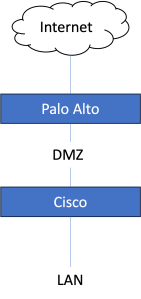
An example of this would be if your business is protected from the internet by a firewall made by Palo Alto. Behind this PA firewall is a DMZ and the DMZ is separated from your internal network by a firewall from Cisco. This layered defense will make it more difficult for attackers to get through the external firewall, DMZ, internal firewall and into the LAN. (See image below for a very simplistic visual)

Downside Of All The Things

All the things may sound great, but unless you are required to meet that level of security there can be a lot of downsides.

First, multiple technologies introduce complexity into an environment. This can make it more difficult to troubleshoot or detect issues (including security events). It can also make it more difficult to operationally support these technologies because they may have different interfaces, APIs, protocols, configurations, etc. It may not be possible to centrally manage these technologies, or it may require the introduction of an additional technology to manage everything.

Second, all of these technologies can increase the number of people required to support them. People time can really add up as a hidden cost and shouldn’t be thrown away lightly. People time starts the second you begin discussing the requirements for a new technology and can include the following:

  • Proof of Concepts (PoCs)
  • Tradeoff & Gap Analysis
  • Requests for Information (RFI)
  • Requests for Proposal (RFP)
  • Requests for Quotes (RFQ)
  • Contract Negotiation
  • Installation
  • Integration
  • Operation & Support

Finally, multiple technologies can cause performance impacts, increased costs and waste. Performance impacts can happen due to differences in technologies, complexity, configuration errors or over consumption of resources (such as agent sprawl). Waste can happen due to overlap and duplicated functionality because not all of the functionality may not get used despite the fact you are paying for it.

Advantages and Disadvantages Of A Single Tool

A single tool that covers the majority, but not all, of your requirements offers one advantage – simplicity. This may not sound like much, but after years of chasing perfection, technology simplicity can have benefits that may not be immediately obvious.

First, seeking out a single tool that meets the majority of requirements will force your security team to optimize their approach for the one that best manages risk while supporting the objectives of the business. Second, a single tool is easier to install, integrate, operate and support. There is also less demand on the rest of the business in terms of procurement, contract negotiation and vendor management. Lastly, a single tool requires less people to manage it and therefore you can run a smaller and more efficient organization.

The biggest disadvantage of a single tool is it doesn’t provide defense in depth. One other disadvantage is it won’t meet all of your security requirements and so the requirements that aren’t met should fall within the risk tolerance of the business or somehow get satisfied with other compensating controls.

A single tool that covers the majority, but not all, of your requirements offers one advantage – simplicity.

Wrapping Up

There are a lot of advantages to meeting all of your requirements with multiple tools, but these advantages come with a tradeoff in terms of complexity, operational overhead, duplicated functionality and increased personnel requirements. If you operate a security program in a highly regulated or highly secure environment you may not have a choice so it is important to be aware of these hidden costs. A single tool reduces complexity, operational overhead and personnel demands, but can leave additional risk unmet and fails to provide defense in depth. Generally, I favor simplicity where possible, but you should always balance the security controls against the risk tolerance and needs of the business.

We Are Drowning In Patches (and what to do about it)

Last week I had an interesting discussion with some friends about how to prioritize patches using criticality and a risk based approach. After the discussion I starting thinking about how nice it would be if we could all just automatically patch everything and not have to worry about prioritization and the never ending backlog of patches, but unfortunately this isn’t a reality for the majority of organizations.

Whats the problem?

There are several issues that create a huge backlog of patches for organizations.

First, let’s talk about the patching landscape organizations need to deal with. This is largely spit into two different areas. The first area is operating system (OS) and service patches. These are patches that are released periodically for the operating systems used by the business to run applications or products. Common operating systems for production workloads will be either Windows or Linux and will have stability, security or new feature patches released periodically.

Second, there are patches for software libraries that are included in the software and applications developed by your business. Typically these are lumped into the category of 3rd party libraries, which means your organization didn’t write these libraries, but they are included in your software. 3rd party library security vulnerabilities have become a huge issue over the last decade (but thats a blog post for another day).

These two patch types, OS and 3rd party library patches, require different approaches to discover, manage and remediate, which is the first challenge for auto patching. When combined with the volume of new vulnerabilities being discovered, large heterogeneous environments and the need to keep business critical applications available, keeping your assets patched and up to date becomes a real challenge.

Why isn’t auto patching a thing?

Well it is, but…

There are a few challenges to overcome before you can auto-patch.

Stability and Functionality

First, both operating system and 3rd party library patches need to be tested for stability and functionality. Usually, patches fix some sort of issue or introduce new features, but this can cause issues in other areas such as stability or functionality. It can be a complex process to roll back patches and restore business critical applications to a stable version, which is why most businesses test their patches in a staging environment before rolling them out to production. Cash is king and businesses want to minimize any disruption to cash flow.

Investment and Maturity

It is possible to automate testing for stability and functionality, but this requires a level of maturity and investment that most organizations haven’t achieved. For example, assuming your staging environment is a mirror image of your production environment (it is right?), you could auto apply the patches in staging, automatically check for stability and functionality over a set period of time and then roll those updates to production with minimal interaction. However, if your environment requires reboots or you have limited resources, patching may require down time, which could impact making money.

In order to have an environment that can support multiple versions, seamless cut over, proper load balancing, caching, etc. requires significant investment. Typically this investment is useful for keeping your products functioning and making money even if something goes wrong, but this investment can also be used to buffer maintenance activities such as patching without disruption.

Software Development Lifecycle

The last section assumes a level of software development maturity such as adoption of Agile development processes and CI/CD (continuous integration / continuous delivery). However, if your engineering group uses a different development process such as Incremental or Waterfall, then patching may become even more difficult because you are now competing with additional constraints and priorities.

What are some strategies to prioritize patching and reduce volume?

If your business runs products that aren’t mission critical, or you simply can’t justify the investment to operate an environment without down time, then auto patching probably isn’t a reality for you unless you are Austin Powers and like to live dangerously. For most organizations, you will need to come up with a strategy to prioritize patching and reduce the volume down to a manageable level.

Interestingly, this problem space has had a bunch of brain power dedicated to it over the years because it resembles a knapsack problem, which is a common problem space in mathematics, computer science and economics. Knapsack problems are problems where you have a finite amount of a resource (space, time, etc.) and you want to optimize the use of that resource to maximize some sort of requirement (like value). In the case of patching, this would mean applying the largest volume of the highest severity patches in a fixed time period to realize the maximum risk reduction possible.

Critical Assets First

Staying in the knapsack problem space, one strategy is to start with your most critical assets and apply the highest severity patches until you reach your threshold for risk tolerance. This requires your organization to have an up to date asset inventory and have categorized your assets based on business criticality and risk. For example, let’s say you have two applications at your business. One is a mission critical application for customers and generates 80% of your annual revenue. The other application provides non-mission critical functionality and accounts for the other 20% of revenue. Your risk tolerance based on your company policies is to apply all critical and high patches within 72 hours of release. In this example you would apply all critical and high patches to the mission critical application as quickly as possible (assuming other requirements are met like availability, etc.).

Guard Rails and Gates

Another strategy for reducing volume is to have guard rails or gates as part of your software development lifecycle. This means your engineering teams will be required to pass through these gates at different stages before being allowed to go to production. For example, your organization may have a policy that no critical vulnerabilities are allowed in production applications. The security organization creates a gate that scans for OS and 3rd party library vulnerabilities whenever an engineering team attempts to make changes to the production environment (like pushing new features). This way the engineering team needs to satisfy any vulnerability findings and apply patches at regular intervals coinciding with changes to production.

Wrapping Up

With the proliferation of open source software, the speed of development and the maturity of researchers and attackers to find new vulnerabilities, patching has become an overwhelming problem for a lot of organizations. In fact, it is such a big problem CISA and the Executive Order On Improving The Nation’s Cybersecurity list software patches and vulnerabilities as a key national security issue. I’ve outlined a few strategies to prioritize and reduce the volume of patches if your organization can’t afford the investment to absorb downtime without disruption. However, no matter what strategy you choose, all of them require strong fundamentals in asset inventory, asset categorization and defined risk tolerance. While these investments may seem tedious at first, the more disciplined you are about enforcing the security fundamentals (and engineering maturity), the less you will drown in patches and the closer your organization will come to the reality of auto-patching.

The Problem With Vulnerability Scanners

Vulnerability scanners are table stakes for any security program and they help security teams proactively identify and report on the security posture of assets, but unless you tune them properly they can lead to more problems than they fix. Here are a few things you need to take into consideration when selecting and using a vulnerability scanner as part of your security tooling.

Scanning Technique

There are two primary scanning techniques used by vulnerability scanners. The first is an unauthenticated scan, which is essentially an external scan that attempts to enumerate the ports and services running on the system or device and then match those up to known vulnerabilities. The advantage of an unauthenticated scan is it is usually easier to implement because you don’t have to load any agents onto systems. You simply turn on the service at a centralized location, tell it the IP ranges or subnet to scan and then have it dump the output somewhere you can review. However, this convenience comes with a tradeoff in terms of accuracy and coverage. By coverage I mean the ability for the scanner to fully scan everything that could be potentially be vulnerable on the system it is scanning.

The second type of scan is an authenticated scan. Authenticated scans typically require an agent to be installed on the system or for the scanner to somehow log into the device so it can scan the running services and applications for known vulnerabilities. An authenticated scan is much more accurate because the scanning agents are running on the same OS as the services and so it can eliminate false positives and provide a more comprehensive scan. However, authenticated scans also come with a tradeoff, which is you are getting much higher accuracy and coverage, but that increase in volume doesn’t factor in where that system is in your environment (i.e. internally vs. externally facing). As a result your reporting may not accurately measure the true risk to the business and you could end up having engineering teams spend time fixing vulnerabilities that may not really be a risk.

How Good Is Your Inventory?

No matter which type of scanning you choose, the scanners are only as good as your asset inventory. You can’t report on and fix what you don’t know about and so the ability to identify and scan assets is critically important. This is where an authenticated scan via agents can present a false picture to a security team. It is easy for the team to assume they are scanning the full environment, but that may not be the case if the agents aren’t installed on everything or if the scanner isn’t scanning all of your devices. Vulnerability scanners shouldn’t just scan your operating systems (compute), but should also scan your network, storage, IoT devices and anything else with a network address to present a complete picture of your enterprise.

Agents

Agents are great for increasing your scan accuracy and coverage, but they present their own challenges. First, you need to deploy all those agents onto your systems and make sure they don’t cause performance issues. This can be a time consuming process to tune the compute, storage and memory for your workloads. Second, it is easy to run into agent creep and have systems with dozens of agents on them that each do something different. These agents can conflict with each other for resources and can be difficult to manage for operational support teams.

Scan Remediation Gap

Vulnerability scanners have an inherent problem when identifying new vulnerabilities. It is often the case that a vulnerability scanner can get updated with a new vulnerability, but a fix or patch may not yet exist to remediate the vulnerability. This can present a problem for businesses that are trying to react to a critical issue quickly, but have to wait for a vendor or developer to provide a fix or implement a more complex compensating control instead. A good question for your vulnerability scan vendor is how quickly they can update their scanner and do they provide additional information about whether a fix is available or not.

CVSS Scores Aren’t Very Useful

CVSS scores have their value, but they aren’t particularly useful to prioritize risk. A truly effective vulnerability management program will take into consideration a lot of other data along with the vulnerability score to make a true determination of risk and prioritize remediation efforts. Some things I recommend adding to your vulnerability reporting to help you prioritize are the following:

  • Business criticality of the system (can it go down or is it revenue generating?)
  • How much revenue does this system make?
  • Is the system publicly facing or is it only accessible internally?
  • Is an exploit available?
  • Is a patch available?
  • What is the complexity of the exploit?
  • Are there other compensating controls already in place (like a WAF) or can you put them in place quickly?

Wrapping Up

Vulnerability scanners are an essential tool in any security program, but they can give security teams false confidence or worse, create a lot of noise for engineering teams. Understanding what type of scan you are using, the tradeoffs for that type of scan and linking the results of your scan to business risk can help any security team accurately identify and prioritize vulnerability remediation.